

Model Construction#
Nonlinear programming (NLP) is the process of solving an optimization problem where some of the constraints are not linear equalities and/or the objective function is not a linear function. Such optimization problems are pervasive in business and logistics: inventory management, scheduling employees, equipment delivery, and many more.
Nonlinear Models#
The dwave-optimization tool enables you to formulate the nonlinear models needed for such industrial optimization problems. The model can then be submitted to the Leap service’s quantum-classical hybrid nonlinear solver (also known as the Stride™ hybrid solver) to find good solutions. The design principles and major features are described in the dwave-optimization philosophy page.
This section explains the nonlinear model and shows how to construct such a model. The Using the Stride Solver section shows how to submit these models for solution. Successful implementation, as for any solver, requires following some best practices in formulating your model.
For other models (e.g., CQM), see the Other Models section.
Symbols#
dwave-optimization nonlinear models can be mapped to a directed acyclic graph. The model’s symbols—decision variables, intermediate variables, constants, and mathematical operations—are represented as nodes in the graph while the flow of operations upon these symbols are represented as the graph’s edges.
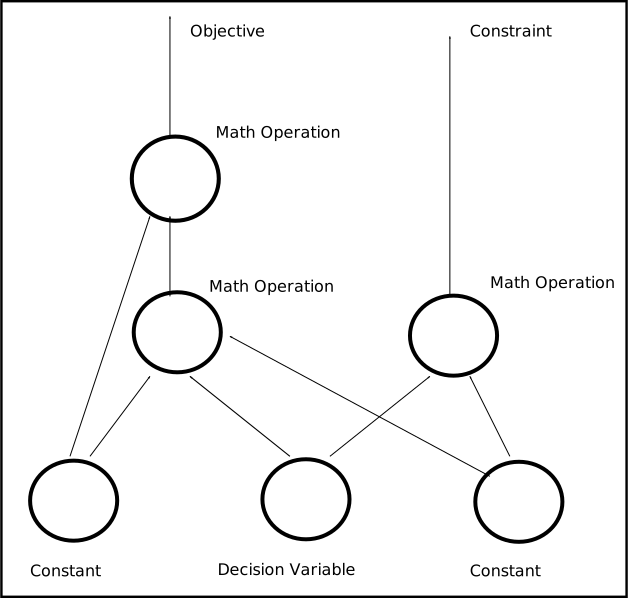
Fig. 5 A nonlinear model as a directed acyclic graph.#
Consider an illustrative problem of finding the minimum of a function of an integer variable, the polynomial \(y = i^2 - 4i\).
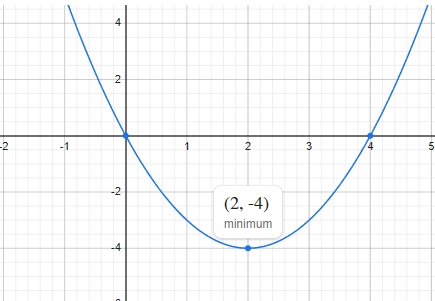
Fig. 6 Minimum point of a simple polynomial, \(y = i^2 - 4i\).#
The dwave-optimization package can formulate the problem as nonlinear model as follows:
>>> from dwave.optimization import Model
...
>>> model = Model()
>>> i = model.integer(lower_bound=-5, upper_bound=5)
>>> c = model.constant(4)
>>> y = i**2 - c*i
>>> model.minimize(y)
The code above has the following elements:
iis aIntegerVariablesymbol, typically constructed with theinteger()method, that represents a single integer of values between \(-5\) and \(+5\). It is a decision variable: to find the minimum of the polynomial, a solver must assign values to decision variableisuch that the objective function of this model is minimized.cis aConstantsymbol that represents a single invariable value, \(4\), which is the linear coefficient multiplying \(i\) in the polynomial. This type of symbol is used as input to mathematical operations but its value is never updated by a solver.yis an intermediate symbol used for convenience to formulate the model in a human-readable way. It is fully determined by other symbols—theiandcsymbols—and so implicitly constrained. A solver must updateyif it updatesi, to a value fully determined by the value it selected to assign toi.The
Minsymbol is a mathematical operation on inputs from other symbols. In this model, it generates the objective function.
The directed acyclic graph below illustratively represents the model for minimizing polynomial \(y = i^2 - 4i\).

Fig. 7 A directed acyclic graph that illustrates one way of representing the model for minimizing polynomial \(y = i^2 - 4i\).#
The dwave-optimization package’s
to_networkx() method generates the graph
that represents the model. The following code uses
DAGVIZ to draw the NetworkX graph
for the \(y = i^2 - 4i\) polynomial.
>>> import dagviz
...
>>> G = model.to_networkx()
>>> r = dagviz.render_svg(G)
>>> with open("model.svg", "w") as f:
...     f.write(r)
This creates the following image:
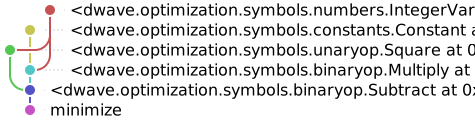
Fig. 8 The directed acyclic graph for the model.#
The package provides various symbols that enable you to select those most suited to an efficient formulation of your model.
Tip
Scan the symbols section to see supported symbols, and follow the links from a symbol you need to the method used to instantiate it.
States#
States represent assignments of values to a symbol. For example, an integer
decision variable, represented by an
IntegerVariable symbol, of size
\(2 \times 3\), might have states
Such states, which might be returned from a solver, represent two assignments that differ in one element of the array (element \((0,2)\)), as is typical at the end of an iterative solution process.
The solutions to nonlinear models you submit to the
Leap service’s Stride solver are states
of the model’s decision variables. For example, the state of symbol
i in the model above for the simple polynomial, \(y = i^2 - 4i\).
The dwave-optimization package enables you to set the states of symbols in a model. You can set states for two purposes:
Setting initial states for the solver. For some problems you might have estimates or guesses of solutions, and by providing to the solver, as part of your problem submission, such assignments of decision variables as an initial state of the model, you may accelerate the solution.
Testing and developing your models.
Setting States#
A newly created model has a state size of zero. After the Stride solver
returns solutions, the model’s state size is the number of states returned for
your problem. The following code, as an example of testing, sets a state size of
five for the \(y = i^2 - 4i\) polynomial’s model (meaning decision variable
i has five assigned solution values).
>>> print(model.states.size())
0
>>> model.states.resize(5)
...
>>> for name, sym in {"i": i, "c": c, "y": y}.items():
...     try:
...         print(f"Variable {name} has value {sym.state(0)} for state 0")
...     except:
...         print(f"Cannot access variable {name}")
Variable i has value 0.0 for state 0
Variable c has value 4.0 for state 0
Cannot access variable y
States for the decision variable have been initialized (to zero for the
IntegerVariable of this example),
states for the constant symbols have an invariable value, but states of
intermediate (successor) symbols, which are implicitly constrained, depend on
the states of predecessor symbols; in this example, the state of \(y\) is
set based on the states of \(i\) and \(c\). This is calculated only when
the model is locked using the lock()
method.
>>> with model.lock():
...     print(f"Variable y has value {y.state(0)} for state 0")
Variable y has value 0.0 for state 0
The following code sets values for states 0 to 4 of decision variable i
and prints the resulting value of the model’s objective function for
each state.
>>> with model.lock():
...     for indx in range(model.states.size()):
...         i.set_state(indx, [indx])
...         print(f"For state {indx}, i={i.state(indx)} results in objective {model.objective.state(indx)}")
For state 0, i=0.0 results in objective 0.0
For state 1, i=1.0 results in objective -3.0
For state 2, i=2.0 results in objective -4.0
For state 3, i=3.0 results in objective -3.0
For state 4, i=4.0 results in objective 0.0
Accessing States#
The code above selects a symbol by label (’i’); however, you can also
select symbols in a model without using labels. Use the
iter_decisions() method to iterate over a
model’s decision variables, or the
iter_symbols() and
iter_constraints() methods for all the
model’s symbols and constraints. The \(y = i^2 - 4i\) polynomial’s model has
just one decision variable:
>>> with model.lock():
...     model.states.resize(1)
...     decision_var = next(model.iter_decisions())
...     decision_var.set_state(0, [2])
...     print(model.objective.state(0))
-4.0
This process of iterating through a model to select symbols of various types (decision variables, constraints, etc) is helpful when constructing the model is separated from submitting the model to a solver for solutions, for example in a production application or when using the package’s model generators.
You might use a generator for a bin packing problem,
bin_packing(), for example, to find the
smallest number of bins that can hold a set of weighted items, given that each
bin has a weight capacity:
>>> from dwave.optimization.generators import bin_packing
>>> model = bin_packing([3, 5, 1, 3], 7)
Thees two lines of code instantiate a model for packing four items with various
weights into bins with maximum capacity 7. With a generator, in contrast to a
model you construct before using, you might not have direct access to its
variables to inspect states. You can submit the model to the Stride solver,
as shown in the Using the Stride Solver section, and the solver sets some number
of states in the model. To see these returned solutions, you select the model’s
decision variable with the
iter_decisions() method.
>>> items = next(model.iter_decisions())
Constructing Models#
Typically, you construct your model by instantiating decision-variable symbols,
using such model methods as
integer() and
set(), and constants
(constant()). You then perform operations
on these symbols, using functions such as matrix multiplication,
matmul(), creating successor symbols. In
this way you formulate objectives and constraints. You can use the
minimize() method to specify the symbol
representing an objective to optimize for.
You can create a model for the
traveling salesperson
problem using the list() method to
instantiate a ListVariable symbol, as the
decision variable, and the constant()
method to hold a distance matrix as a
Constant symbol. The list decision variable
is used for this problem because any itinerary of cities, each visited once, is
a permutation of the cities to be
visited (with each city represented by an integer).[1]
>>> from dwave.optimization import Model
...
>>> model = Model()
>>> ordered_cities = model.list(3)          # decision variable
>>> DM = model.constant([                   # constant distance matrix
...     [0, 3, 1],
...     [1, 0, 3],
...     [3, 1, 0]])
Such decision-variable symbols and constant symbols form the “root” of the directed acyclic graph underlying the model.
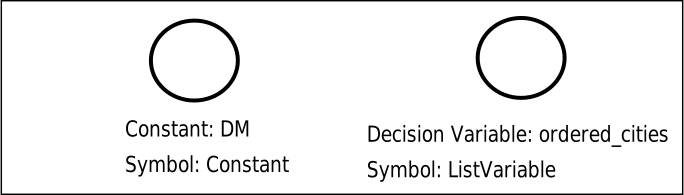
Fig. 9 A directed acyclic graph that shows a single decision variable,
ordered_cities, represented by a
ListVariable symbol, and a
constant, DM, represented by a
Constant symbol, which holds the
distance matrix.#
Typically, you add symbols to the model through
mathematical operations between symbols. The
BasicIndexing symbol, for example, is
created by operations similar to those of
NumPy’s basic indexing. These symbols are
successors of the root symbols on the directed acyclic graph, and form part of
the mathematical formulation.
>>> from_city = ordered_cities[:-1]
>>> to_city = ordered_cities[1:]
>>> first_city = ordered_cities[0]
>>> last_city = ordered_cities[-1]
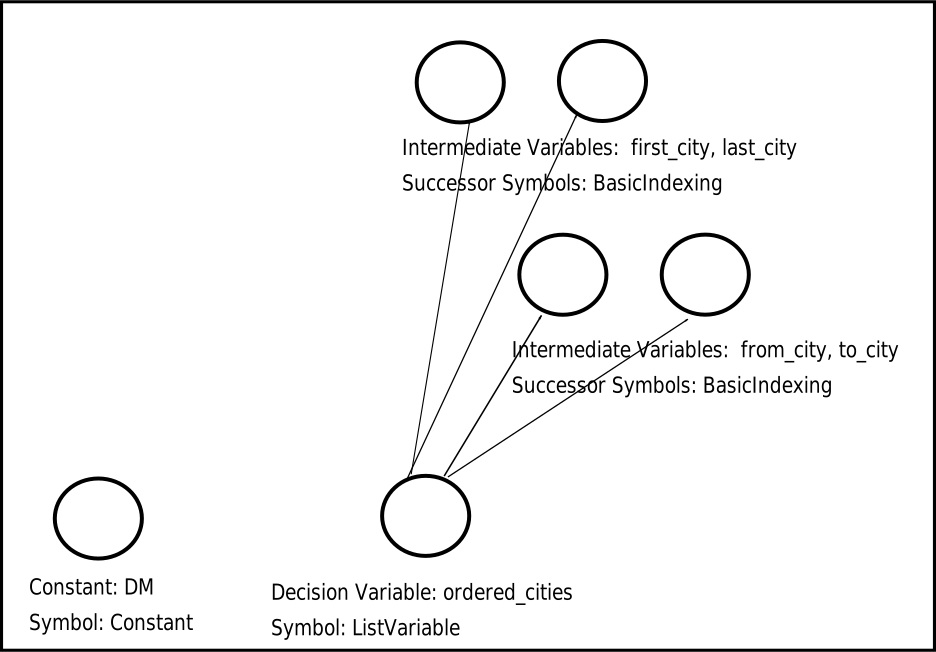
Fig. 10 A directed acyclic graph that shows the root symbols at the bottom and the
BasicIndexing symbols above those.#
You can access these symbols by iterating on the model’s symbols.
>>> with model.lock():
...     for symbol in model.iter_symbols():
...         print(f"Symbol {type(symbol)} is node {symbol.topological_index()}")
Symbol <class 'dwave.optimization.symbols.collections.ListVariable'> is node 0
Symbol <class 'dwave.optimization.symbols.constants.Constant'> is node 1
Symbol <class 'dwave.optimization.symbols.indexing.BasicIndexing'> is node 2
Symbol <class 'dwave.optimization.symbols.indexing.BasicIndexing'> is node 3
Symbol <class 'dwave.optimization.symbols.indexing.BasicIndexing'> is node 4
Symbol <class 'dwave.optimization.symbols.indexing.BasicIndexing'> is node 5
The AdvancedIndexing symbol is created
by operations similar to those of
NumPy’s advanced indexing. It is used here to
represent the distances between cities for the selected itinerary and the
distance to return from the last city to the first.
>>> itinerary = DM[from_city, to_city]
>>> return_to_origin = DM[last_city, first_city]
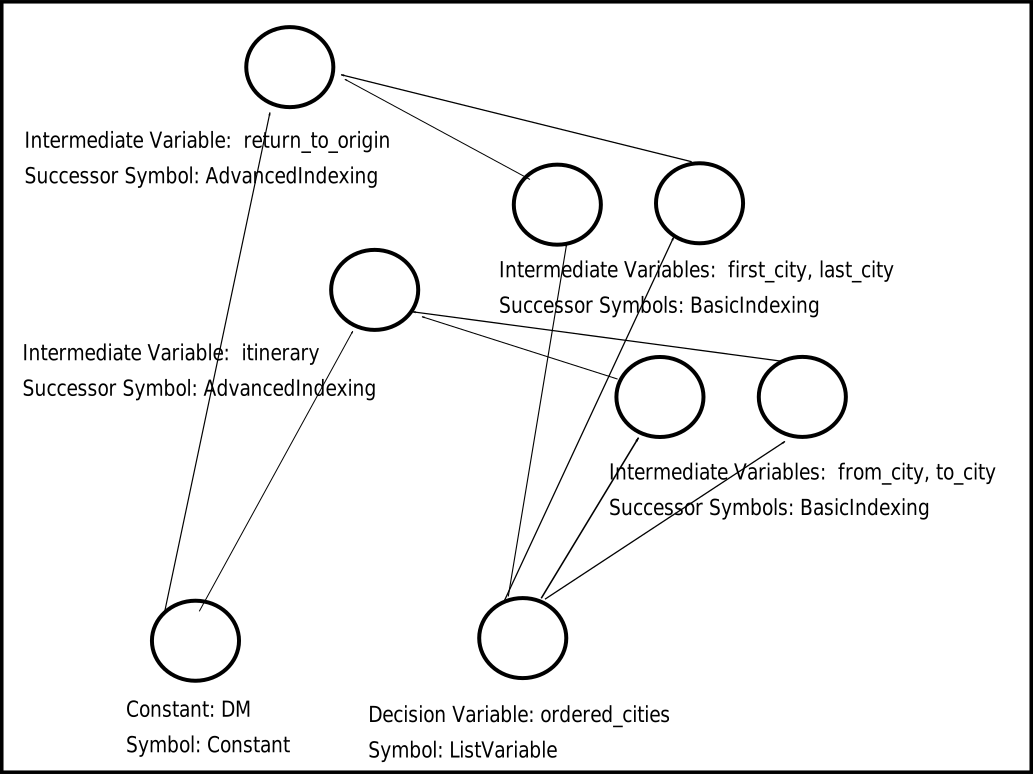
Fig. 11 A directed acyclic graph that shows the root symbols at the bottom and the
BasicIndexing and
AdvancedIndexing symbols above those.#
Next, sum the distances. Note that the total sum uses the + operation,
which is equivalent to the add()
function.
>>> distance_itinerary = itinerary.sum()
>>> distance_return = return_to_origin.sum()
>>> distance_total = distance_itinerary + distance_return
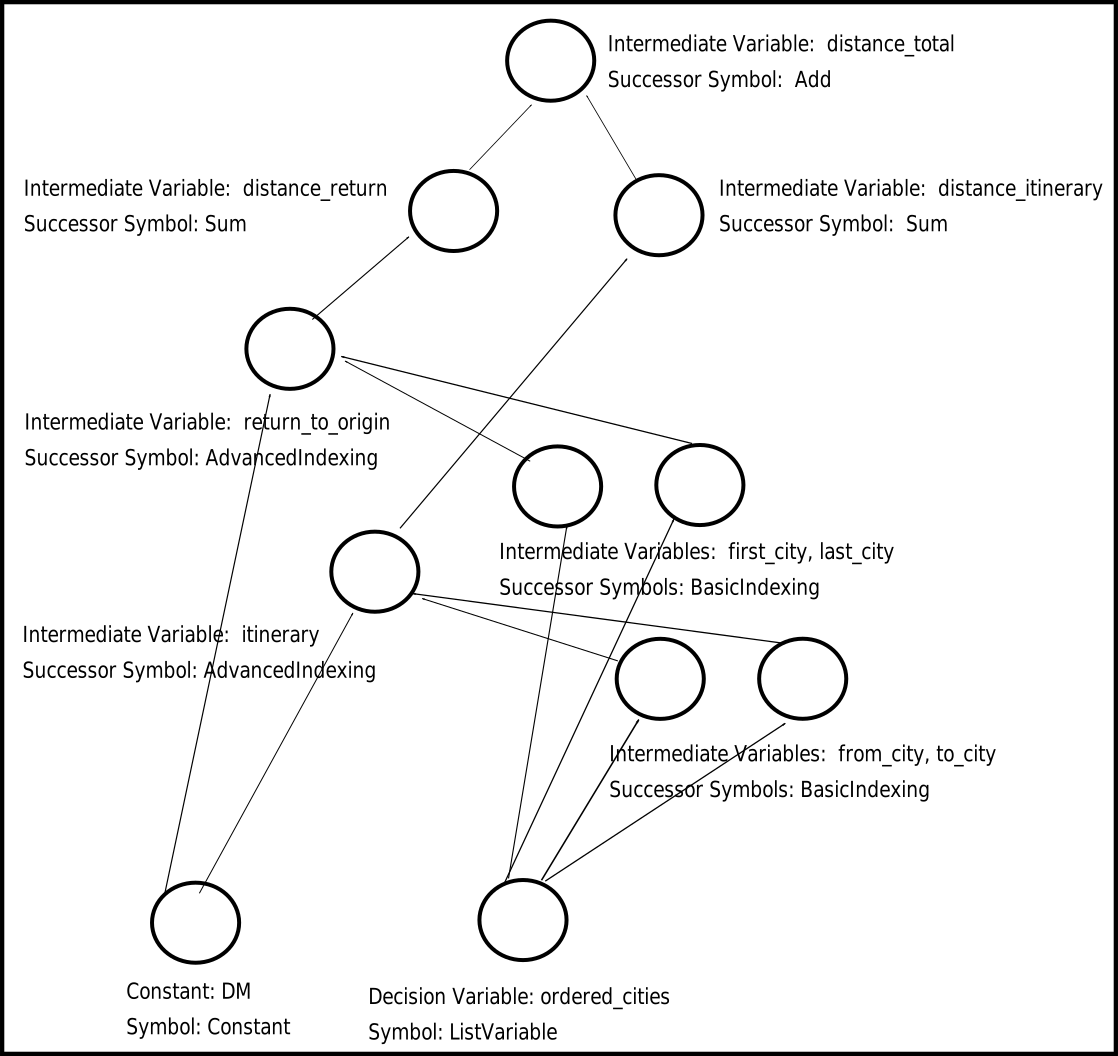
Fig. 12 A directed acyclic graph that shows the root symbols at the bottom, the
BasicIndexing and
AdvancedIndexing symbols above those,
and the Sum and
Add symbols.#
Finally, you can define the objective, which is to minimize the distance traveled.
>>> model.minimize(distance_total)
Using the same few lines of code as in the Symbols section above, you can draw the graph of the model.
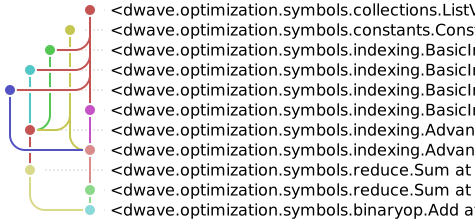
Fig. 13 The directed acyclic graph for the model.#
You can now submit the model to the Stride solver or test it. Here, all
permutations of a ListVariable decision
variable of length three are tested.
>>> import itertools
...
>>> list_values = [0, 1, 2]
>>> with model.lock():
...     model.states.resize(1)
...     for solution in itertools.permutations(list_values):
...         ordered_cities.set_state(0, solution)
...         print(f"Itinerary {solution} has distance {distance_total.state(0)}")
Itinerary (0, 1, 2) has distance 9.0
Itinerary (0, 2, 1) has distance 3.0
Itinerary (1, 0, 2) has distance 3.0
Itinerary (1, 2, 0) has distance 9.0
Itinerary (2, 0, 1) has distance 9.0
Itinerary (2, 1, 0) has distance 3.0
In practice, you would likely code such a model with fewer labeled symbols.
>>> from dwave.optimization import Model
...
>>> model = Model()
>>> ordered_cities = model.list(3)
>>> DM = model.constant([
...     [0, 3, 1],
...     [1, 0, 3],
...     [3, 1, 0]])
>>> itinerary = DM[ordered_cities[:-1], ordered_cities[1:]]
>>> return_to_origin = DM[ordered_cities[-1], ordered_cities[0]]
>>> distance_total = itinerary.sum() + return_to_origin.sum()
>>> model.minimize(distance_total)
You might even use an existing generator, such as the
traveling_salesperson() generator, in which
case you have no labels at all.
>>> from dwave.optimization.generators import traveling_salesperson
...
>>> DM = [[0, 3, 1], [1, 0, 3], [3, 1, 0]]
>>> model = traveling_salesperson(distance_matrix=DM)
In such cases, you access the model’s states using the
iter_decisions(),
iter_symbols(), and
iter_constraints() methods.
>>> with model.lock():
...     model.states.resize(1)
...     itinerary = next(model.iter_decisions())
...     itinerary.set_state(0, [0, 2, 1])
...     print(f"Objective is {model.objective.state(0)}")
Objective is 3.0
Successful implementation, as for any solver, requires following some best practices in formulating your model: see the Building Good Models for guidance.
Other Models#
This section provides examples of creating quadratic models that can then be solved on a Leap service hybrid solver such as the CQM solver. Typically you construct a model when reformulating your problem, using such techniques as those presented in the Reformulating a Problem section.
The dimod package provides a variety of model generators. These are especially useful for testing code and learning.
CQM Example: Using a dimod Generator#
This example creates a CQM representing a knapsack problem of ten items.
>>> cqm = dimod.generators.random_knapsack(10)
CQM Example: Symbolic Formulation#
This example constructs a CQM from symbolic math, which is especially useful for learning and testing with small CQMs.
>>> x = dimod.Binary('x')
>>> y = dimod.Integer('y')
>>> cqm = dimod.CQM()
>>> objective = cqm.set_objective(x+y)
>>> cqm.add_constraint(y <= 3)
'...'
For very large models, you might read the data from a file or construct from a NumPy array.
BQM Example: Using a dimod Generator#
This example generates a BQM from a fully-connected graph (a clique) where all linear biases are zero and quadratic values are uniformly selected -1 or +1 values.
>>> bqm = dimod.generators.random.ran_r(1, 7)
BQM Example: Python Formulation#
For learning and testing with small models, construction in Python is convenient.
The maximum cut problem is to find a subset of a graph’s vertices such that the number of edges between it and the complementary subset is as large as possible.
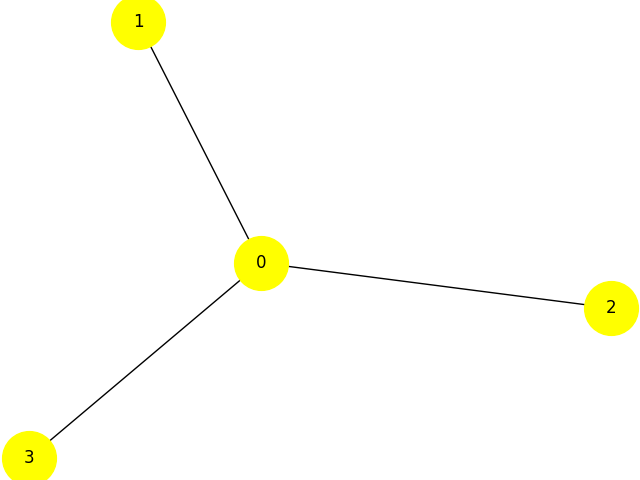
Fig. 14 Star graph with four nodes.#
The dwave-examples Maximum Cut example demonstrates how such problems can be formulated as QUBOs:
>>> qubo = {(0, 0): -3, (1, 1): -1, (0, 1): 2, (2, 2): -1,
...         (0, 2): 2, (3, 3): -1, (0, 3): 2}
>>> bqm = dimod.BQM.from_qubo(qubo)
BQM Example: Construction from NumPy Arrays#
For performance, especially with very large BQMs, you might read the data from a
file using methods, such as from_file()
or from NumPy arrays.
This example creates a BQM representing a long ferromagnetic loop with two opposite non-zero biases.
>>> import numpy as np
>>> linear = np.zeros(1000)
>>> quadratic = (np.arange(0, 1000), np.arange(1, 1001), -np.ones(1000))
>>> bqm = dimod.BinaryQuadraticModel.from_numpy_vectors(linear, quadratic, 0, "SPIN")
>>> bqm.add_quadratic(0, 10, -1)
>>> bqm.set_linear(0, -1)
>>> bqm.set_linear(500, 1)
>>> bqm.num_variables
1001
QM Example: Interaction Between Integer Variables#
This example constructs a QM with an interaction between two integer variables.
>>> qm = dimod.QuadraticModel()
>>> qm.add_variables_from('INTEGER', ['i', 'j'])
>>> qm.add_quadratic('i', 'j', 1.5)
Additional Examples#
The Basic QPU Examples and Basic Hybrid Examples sections have examples of using QPU solvers and Leap service hybrid solvers on quadratic models.
The dwave-examples GitHub repository provides more examples.